SaaS onboarding email flow
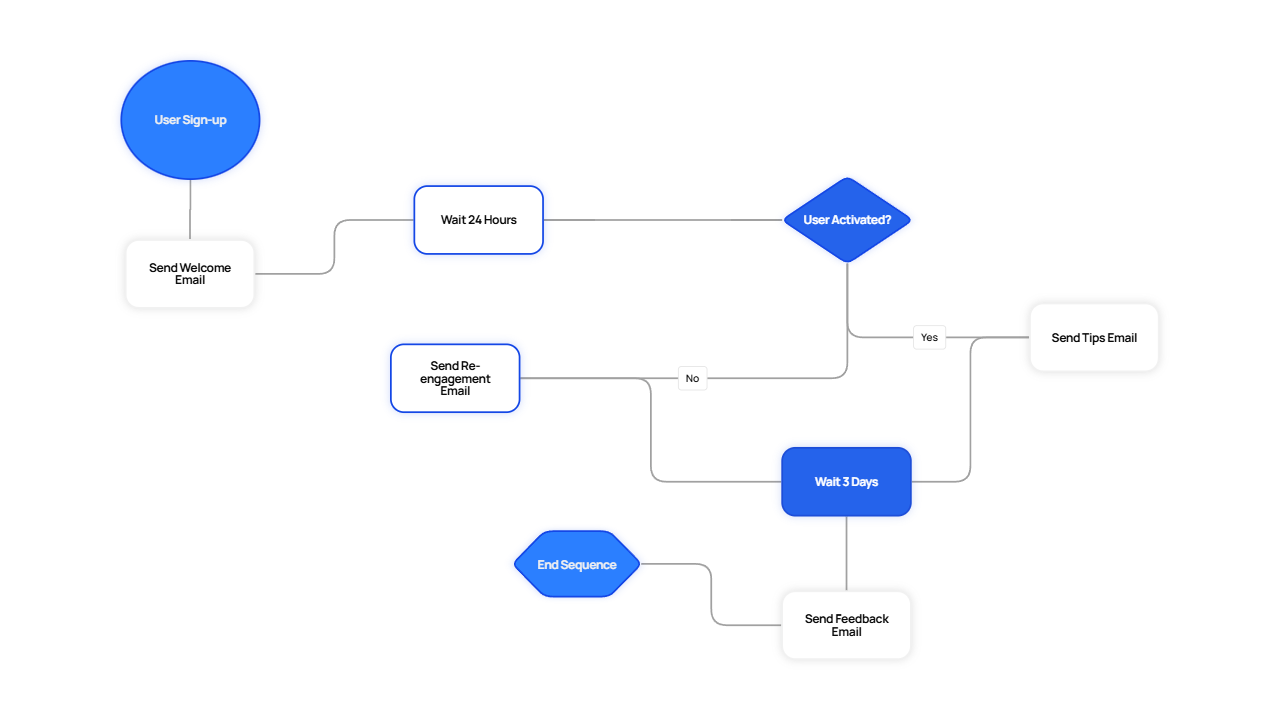
A flowchart for a 4-step SaaS onboarding email sequence. It branches on whether the user has activated within 24 hours: activated users get a tips email, inactive users get a re-engagement nudge.
Recreate this in Raltey
Copy this prompt
Paste this into Raltey's AI agent to generate the same diagram, then tweak it on the canvas.
Prompt
Create a flowchart for a SaaS onboarding email sequence. Start with sign-up, send a welcome email, wait 24 hours, then branch on whether the user has activated. If yes, send a tips email; if no, send a re-engagement email. Both paths wait 3 days and converge on a feedback email before ending.
Context
- - Triggered on sign-up.
- - 4 emails over 7 days plus an activation branch.
- - Re-engagement only fires once.
Patterns
- - Activation branch keeps the sequence relevant.
- - Single re-engagement nudge avoids over-emailing.
- - A common feedback email at the end of the funnel.
Diagram structure
Nodes and connections
User signs upstart
Send welcome emailaction
Wait 24 hoursdelay
Activated?decision
Send tips emailaction
Send re-engagement emailaction
Wait 3 daysdelay
Send feedback emailaction
Endend
Connections
User signs upSend welcome email
Send welcome emailWait 24 hours
Wait 24 hoursActivated?
Activated?Send tips emailyes
Activated?Send re-engagement emailno
Send tips emailWait 3 days
Send re-engagement emailWait 3 days
Wait 3 daysSend feedback email
Send feedback emailEnd
Notes from the field
- Use the same template for trial-to-paid conversion by swapping the activation check.
- Pause the sequence on unsubscribe at every step.
- Track open and click events on each email to refine the branch logic.
Frequently asked
How do I add a paywall step?
Insert a decision node after activation that checks subscription status. Send the trial-ending email to free users only.
Is this free to use?
Raltey's Free plan includes the AI agent, 5 projects, and 10 AI generations per month. No credit card required.
More templates
FlowchartCustomer support runbook flowFlowchartPayment webhook retry and error flowFlowchartGitHub PR review and merge flowFlowchartLogin with magic link flowArchitectureThree-tier SaaS architecture on AWSArchitectureMicroservices architecture on KubernetesArchitectureReal-time data pipeline on GCPArchitectureNext.js + Vercel + Postgres SaaS stack
Open this template in Raltey
Edit it on the canvas, ask the AI agent to extend it, then share or export.
Start for free